



The digital landscape has fundamentally shifted. Web design is no longer locked behind a wall of complex syntax, expensive licenses, or thousands of lines of code. Driven by advances in AI-native systems, collaborative environments, and component-based structures, the barrier to entry has completely dissolved.
For beginners looking to build a digital presence, launch a freelance career, or prototype an idea, the available toolkit is more powerful—and accessible—than ever. The challenge shifted from finding a tool to choosing the right one for your specific goals.
This comprehensive guide breaks down the absolute best free web design tools available, categorized by use case, to help you transition from an aspiring creator into a productive digital designer.
1. Visual Design & Prototyping Software
Before building a single page, you need a digital canvas to structure your ideas, map user journeys, and establish your visual identity.
Figma (The Industry Standard)
Figma remains the undisputed powerhouse of UI/UX design. Operating entirely in the cloud, it allows you to wireframe, design pixel-perfect mockups, and create interactive prototypes. The interface is highly intuitive for beginners, relying on flexible vector networks rather than rigid coding boxes.
- Best For: UI/UX layouts, wireframing, high-fidelity mockups, and real-time collaboration.
- The Free Tier: The “Starter” plan offers unlimited personal files, unlimited collaborators, and full access to the design and prototyping editors. It also includes access to the massive Figma Community library.
- Why It Wins for Beginners: The Figma Community is a goldmine. You can copy thousands of free UI kits, icon sets, and website templates directly into your drafts to deconstruct how experienced professionals structure their layouts.
Vectr
If Figma feels overwhelming, Vectr is a streamlined, web-based alternative focused purely on vector graphics. It acts as a lightweight, free alternative to Adobe Illustrator, engineered explicitly for web graphics.
- Best For: Creating custom icons, SVG illustrations, logos, and simple web layouts.
- The Free Tier: Fully free web and desktop applications with real-time sharing links for feedback.
- Why It Wins for Beginners: It skips the steep learning curve of advanced vector math. The drag-and-drop tools and straightforward paths make it easy to export crisp, scalable graphics that won’t slow down a live website.
2. No-Code & AI-Native Web Builders
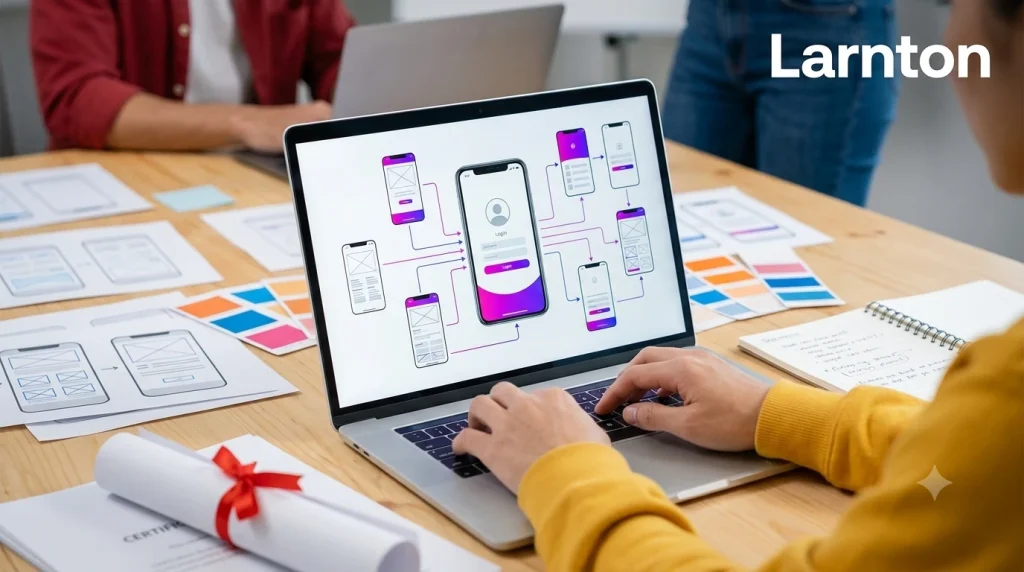
Once your layouts are ready, you need a way to bring them to life on the web. The modern ecosystem splits these into two types: AI-driven text-to-site generation and visual drag-and-drop builders.
Wix Harmony & Hostinger Horizons (AI-Driven Speed)
AI-native site generation has made building functional websites faster than ever. Wix Harmony (inspired by their evolutionary Artifical Design Intelligence) and Hostinger Horizons allow you to input natural language prompts and receive a fully structured website in under three minutes.
- Best For: Launching a functional landing page, portfolio, or local service site rapidly.
- The Free Tier: Free hosting on subdomains (e.g.,
yoursite.wixsite.com) with access to core design adjustments. - Practical Workflow: Instead of spending hours staring at a blank screen, you type a prompt like “Build a clean landing page for a boutique coffee shop with a menu section and contact form.” The system generates layouts, placeholder copy, and curated imagery, leaving you to simply tweak the visual styles.
Webflow (The Visual Code Engine)
Webflow sits at the precise intersection of visual design and front-end development. It does not hide code; instead, it provides a visual GUI over standard CSS and HTML structures (like Flexbox and Grid).
- Best For: Designers who want complete creative control over custom animations, structured databases (CMS), and completely bespoke responsive layouts without typing code manually.
- The Free Tier: The Starter plan is 100% free forever, giving you full access to the Webflow designer, CMS features, and two active staging projects.
- Why It Wins for Beginners: It teaches you the structural rules of the web. By learning how Webflow builds layouts, you are inherently learning how modern web developers think, making it a stellar stepping-stone into professional design.
WordPress (The Open-Source Champion)
Powering a massive chunk of the internet, WordPress remains the standard for deep customization and scalability. When paired with free visual page builders like Elementor, it functions as a highly flexible visual builder.
- Best For: Content-heavy sites, blogs, and scalable e-commerce via free extensions like WooCommerce.
- The Free Tier: Free options exist via WordPress.com (with limitations), or by downloading the core open-source software via WordPress.org and using local staging software or free hosting tiers.
3. Essential UI Kits, Typography, and Asset Libraries
A design tool is only as good as the content you put into it. Beginners often struggle because they try to create everything from scratch. Professional designers use pre-built asset libraries to accelerate their workflows.
| Asset Class | Top Free Tool | Practical Value for Beginners |
| Typography | Fontjoy | Uses deep learning to automatically generate highly balanced font pairings (headers, subheaders, body) so your text looks professional out of the box. |
| Icons | Iconfinder & Feather Icons | Offers thousands of open-source, lightweight SVG icons that can be customized, recolored, and scaled without losing visual quality. |
| Colors | App Kong Color Generator | Generates harmonious color palettes across HEX, RGB, and HSL formats instantly to establish visual branding. |
| Layouts | Figma Community Kits | Downloadable web structural kits containing pre-configured navigation bars, footers, and card designs. |
4. Practical Roadmap for Web Design Beginners
To keep your learning curve manageable and highly productive, follow this simple framework to build your very first website:
[Phase 1: Wireframing] -> Use Figma to map out structural layouts and grid systems.
[Phase 2: Visual Assets] -> Source icons from Feather and match typography via Fontjoy.
[Phase 3: Production] -> Build via Webflow for total control, or Wix Harmony for AI speed.
Step 1: Moodboarding and Color Theory
Before opening software, define your palette using a generator like App Kong. Keep it simple: one dominant color (60%), one secondary color (30%), and one sharp accent color (10%) for buttons and interactive items.
Step 2: The Desktop Layout First approach
Open Figma, drag out a standard desktop frame (1440px width), and map your layout using components from a free UI kit. Focus on high readability, spacious margins, and a single, clear Call to Action (CTA) above the fold.
Step 3: Deployment
If your primary goal is visual mastery and custom interaction, export your design choices into Webflow. If your primary goal is getting a functional website live for a business immediately, use an AI tool like Wix or Hostinger to generate the backbone, then refine it manually using your Figma layout as a guide.
Final Thoughts: Focus on Principles, Not Just the Software
Tools will continue to evolve, integrate AI, and change names, but core design principles—visual hierarchy, clean typography, responsive design, and intuitive user experiences—remain timeless. Start by mastering one design engine (like Figma) and one production engine (like Webflow or a robust AI builder). By combining these free resources effectively, you can build production-ready, beautiful web experiences without spending a single dollar on software.
For a deeper look into selecting your stack, this 5 Best FREE No Code App Builders in 2026 video provides a practical walkthrough of setting up no-code design tools completely for free.